> ## Documentation Index
> Fetch the complete documentation index at: https://learn.withamber.com/llms.txt
> Use this file to discover all available pages before exploring further.
# Changelog
> All notable changes to Amber since 2025
Available at [withamber.com](https://withamber.com)
## Coming Soon
* Amber Assist Conversation History
* Stream Deck Profiles
* Workspace Templates
Have a feature in mind? Let us know.
## Do More With Less Effort
**Platforms:** iOS (build 28) · macOS (build 103)
Better conversations, faster navigation, and a more polished writing experience across the board. Available now on [TestFlight](https://testflight.apple.com/) for Mac, iPhone, and iPad.
Need access? Request your TestFlight invite.
### Added
* **[Turn responses into notes or sections.](/user-guides/amber-copilot)** Love what Amber wrote? Save it as a section in your manuscript or a reference note with one tap.
* **Copy any response.** Grab what you need without leaving your flow.
* **[Delete notes you don't need.](/user-guides/safety-features)** Clean up as you go.
* **Make it yours.** Choose an accent color from six presets or go custom.
* **Everything in one place.** Redesigned settings with Editor, Appearance, Integrations, Shortcuts, and About - all easy to find.
* **See every shortcut.** Searchable keyboard shortcuts reference right inside settings.
### Improved
* **[Jump straight to your last project.](/user-guides/getting-started-writing-with-amber)** The launcher remembers where you left off.
* **[Navigate without the mouse.](/user-guides/quick-navigation)** Move between workspaces entirely from the keyboard.
* **Back button works on mobile.** Tap back and go where you expect.
* **[Faster on long manuscripts.](/user-guides/text-formatting)** Typing feels snappier, especially in larger documents.
* **Scrollbar stays at the edge.** No more floating in the middle of your writing space.
* **Consistent look everywhere.** Notes, chat, sources, and sections share the same clean spacing.
* **Smoother first experience on Mac.** Cleaner onboarding with a refreshed chat interface.
* **Settings fit smaller screens.** Compact layout without feeling cramped.
* **Font, theme, and color in one view.** Editor and appearance settings side by side with live preview.
* **Pixel-perfect panels.** Divider lines and widths snap to exact pixels.
### Fixed
* **[Responses arrive complete.](/user-guides/amber-copilot)** No more cut-off mid-sentence in non-streaming mode.
* **[Drafts stay safe on Mac.](/user-guides/auto-save)** Switching windows no longer risks losing unsaved changes.
* **iPad text selection works.** Select and replace without unexpected behaviour.
* **Fewer crashes.** Fixed crashes when navigating away from settings or chat.
* **Workspace dropdown behaves.** Fixed a default-value issue that could cause selection glitches.
## Write Anywhere
**Platforms:** macOS (build 94) · iOS/iPadOS (build 23)
Amber is now on iPhone and iPad via TestFlight. Start a chapter on your Mac, continue on the train, polish on the iPad. [Your workspace syncs everywhere via iCloud.](/user-guides/storage)
### Added
* **[Your writing space, everywhere.](/user-guides/getting-started-writing-with-amber)** Open Amber on any device. Your workspace is already there, synced and ready.
* **iPad gets its own layout.** A native interface designed for the bigger screen. More room to write, easier to navigate.
* **Rotate however you like.** Portrait for focused writing, landscape for reviewing. Amber adapts.
* **Navigate naturally.** Swipe back, tap forward. Mobile navigation that feels right.
### Improved
* **Consistent feel across devices.** Same menus, same interactions, whether you're on Mac, iPad, or iPhone.
* **Menus appear where you tap.** Chat history and model selection open right where you expect them.
### Fixed
* **Cursor stays where you put it.** Fixed an issue where the cursor would leap to the end while typing on iOS.
***
### Get Started
1. Download [TestFlight](https://testflight.apple.com/) on your iPhone or iPad
2. Request your TestFlight invite
3. Sign in with the same account you use on Mac
4. Start writing
## Write Your Way
**Platforms:** macOS (build 93)
Your hands stay on the keyboard. Your screen reader speaks every action. Your files sync the moment they change.
### Added
* **[Keyboard shortcuts everywhere.](/user-guides/quick-navigation)** Every button, every action, accessible from your keyboard. Jump between sections, manage documents, format text, all without lifting your hands.
* **VoiceOver support.** Full screen reader compatibility. Every button announces what it does.
* **WCAG 2.1 compliance.** 75% of buttons now meet accessibility standards. We're not done, but we're getting there.
### Improved
* **[External changes sync instantly.](/user-guides/auto-save)** Edit your markdown files in VS Code, Obsidian, or any editor. Amber picks up the changes immediately.
* **[Better reliability across platforms.](/user-guides/storage)** Fewer sync hiccups. Your work stays in sync between Mac, iPad, and iPhone.
### Fixed
* **[Line editing works properly.](/user-guides/text-formatting)** Fixed the confusion when modifying paragraphs or applying formats. What you type is what you get.
* **iCloud containers available.** Fixed an issue where iCloud containers weren't available in certain macOS configurations.
* **Cleaner tab bar.** Fixed padding and divider rendering.
* **Consistent markdown.** Better consistency across all platforms.
## Open Files, Open Ecosystem
**Platforms:** macOS (build 91)
Your writing lives in markdown and JSON files you can open anywhere, edit anywhere, version control anywhere. No more proprietary formats.
### Added
* **[Open file format.](/user-guides/file-format)** Everything is stored as `.md` and `.json`. Open your files in VS Code, Obsidian, iA Writer, or any app you love.
* **[Git-ready from day one.](/user-guides/file-format#git-integration--version-control)** Version control your novel. Collaborate on GitHub. Branch your story.
* **[iCloud sync.](/user-guides/storage)** Edit on your Mac, see changes on your iPad. No manual syncing, no conflicts.
* **[Live markdown rendering.](/user-guides/text-formatting)** Write `**bold**` and see it bold. Type `# Chapter One` and see a heading. No mode switching.
* **Smart context indexing.** Every section, note, and source gets indexed. Amber reads only what's relevant, not your entire 100,000-word manuscript.
* **[Visual diffs before you commit.](/user-guides/amber-copilot)** Suggestions show exactly what will change. Green for additions, red for deletions.
* **Accept or reject piece by piece.** Don't like one change? Reject it. Love another? Accept it.
* **[Context selector.](/user-guides/amber-copilot)** Scope conversations to entire workspace, current section, just your notes, or selected text. `⌘L` to chat about any selection.
* **Conversation history.** Pick up where you left off. Chat history persists across sessions.
* **Switch models anytime.** Move between cloud models mid-conversation.
* **[Voice recording and transcription.](/user-guides/voice-recording)** Hit record, speak your scene, see it transcribed. Perfect punctuation, proper formatting.
* **[The `amber.md` file.](/user-guides/amber-copilot#steering-your-copilot)** Create a file that tells Amber how to behave. Define your story's tone, character voices, writing rules.
* **[Sources.](/user-guides/amber-copilot#using-sources-as-context)** Add past works, research documents, worldbuilding notes. Amber draws from them when helping you write.
* **Notes.** Create notes instantly. Full markdown formatting. Quick access in chat mode.
### Improved
* **Editor rewritten from scratch.** Markdown-native storage with rich text display. Better performance, better reliability.
* **Faster responses.** Smarter context selection means less waiting.
* **[Smoother iCloud sync.](/user-guides/storage)** Optimized for frequent changes. Your edits sync faster.
* **[Multi-paragraph formatting preserved.](/user-guides/paragraph-formatting)** Style carries across copy-paste, import, export.
* **Private by design.** All indexing happens locally on your device. Your writing never leaves your machine unless you ask.
### Temporarily Unavailable
* **Text highlighting.** Color highlighting doesn't play nice with markdown. Working on a solution.
* **Fountain screenplay support.** Removed during the editor rewrite. Coming back in a future release.
## Fonts and Dark Mode
### Added
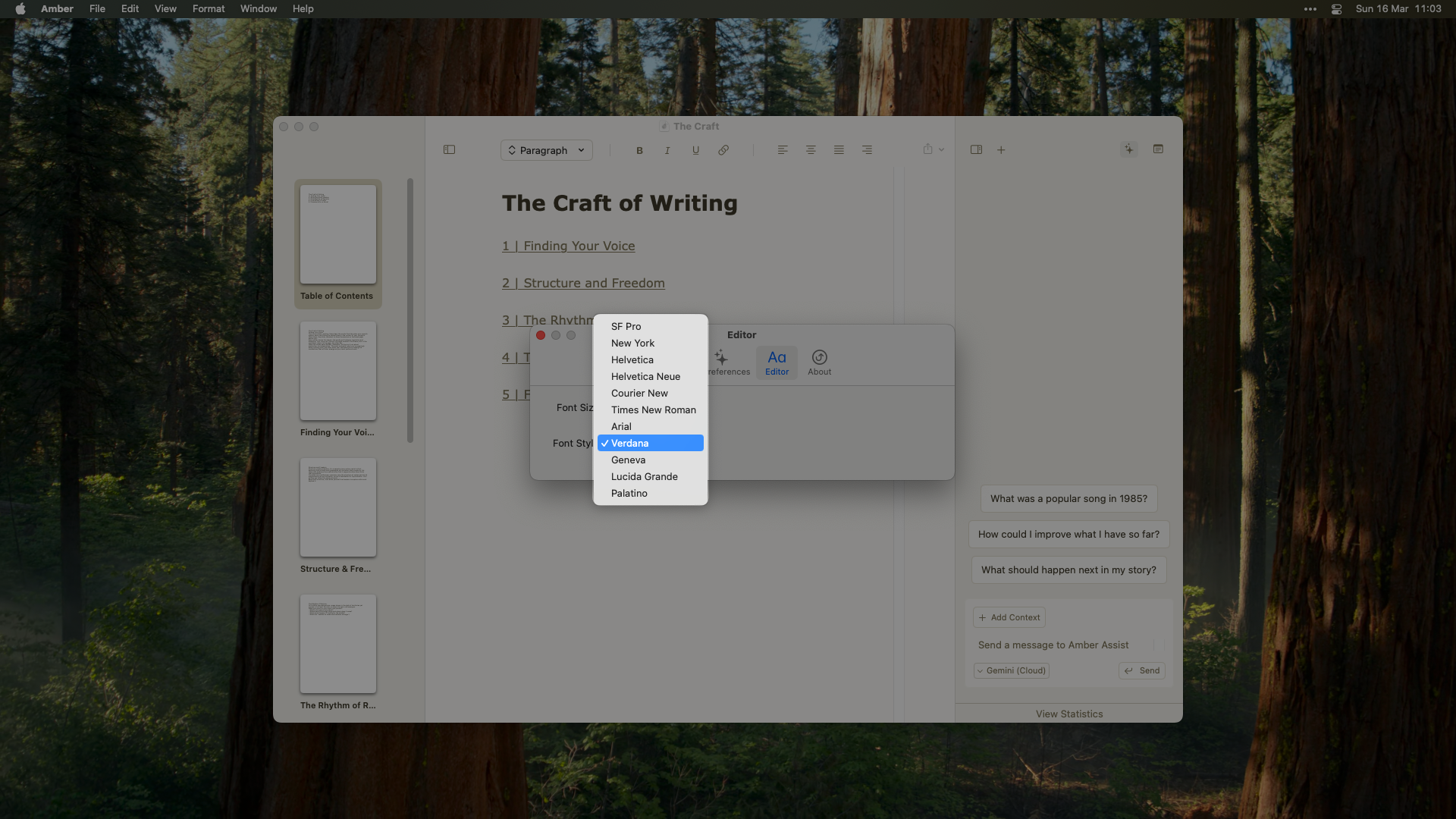
* **11 font options.** SF Pro, New York, Helvetica, Helvetica Neue, Courier New, Times New Roman, Arial, Verdana, Geneva, Lucida Grande, and Palatino.
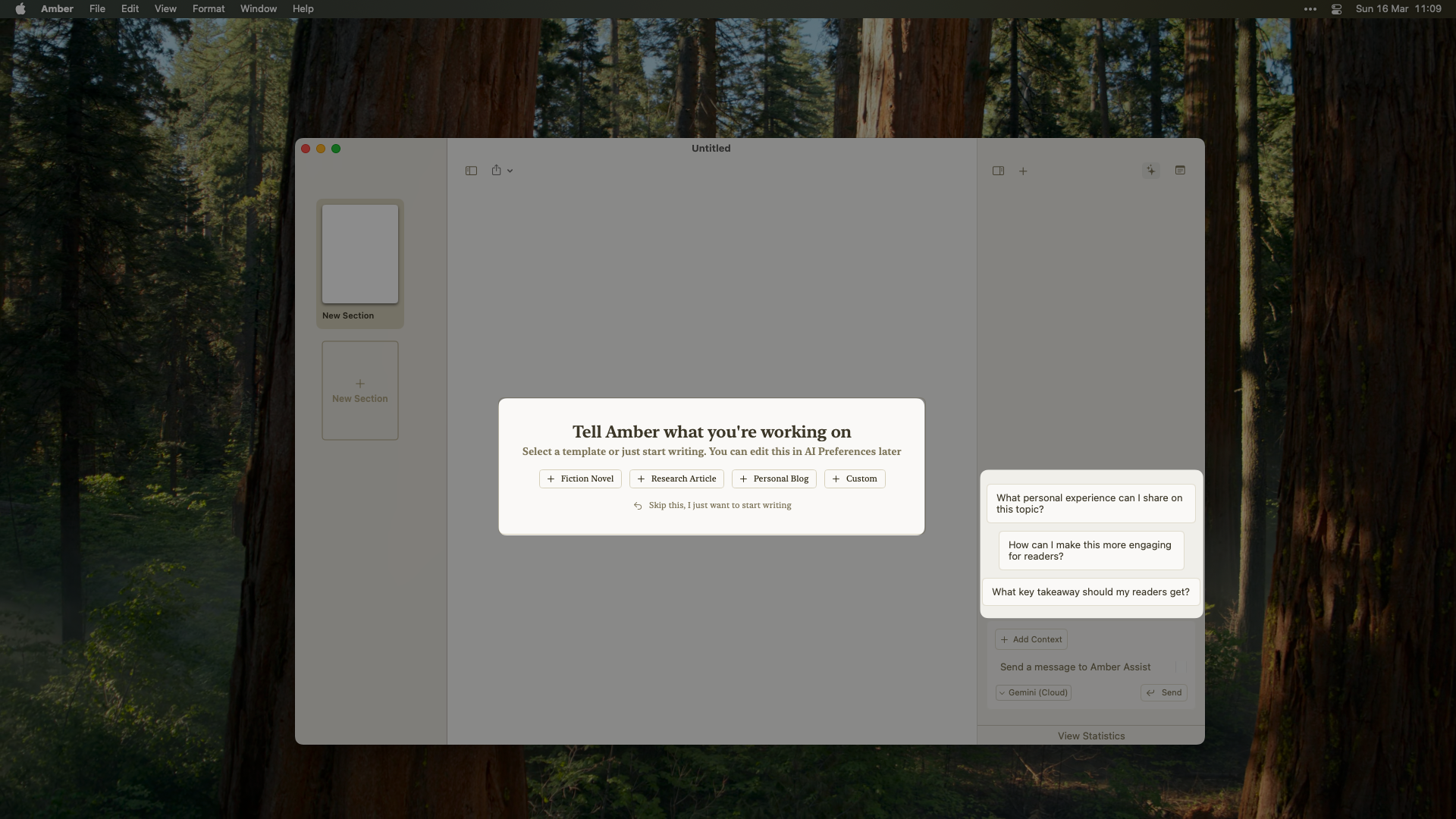
 * **[Template-aware suggestions.](/user-guides/amber-copilot)** Amber Copilot suggestions now change based on template type.
 ### Changed
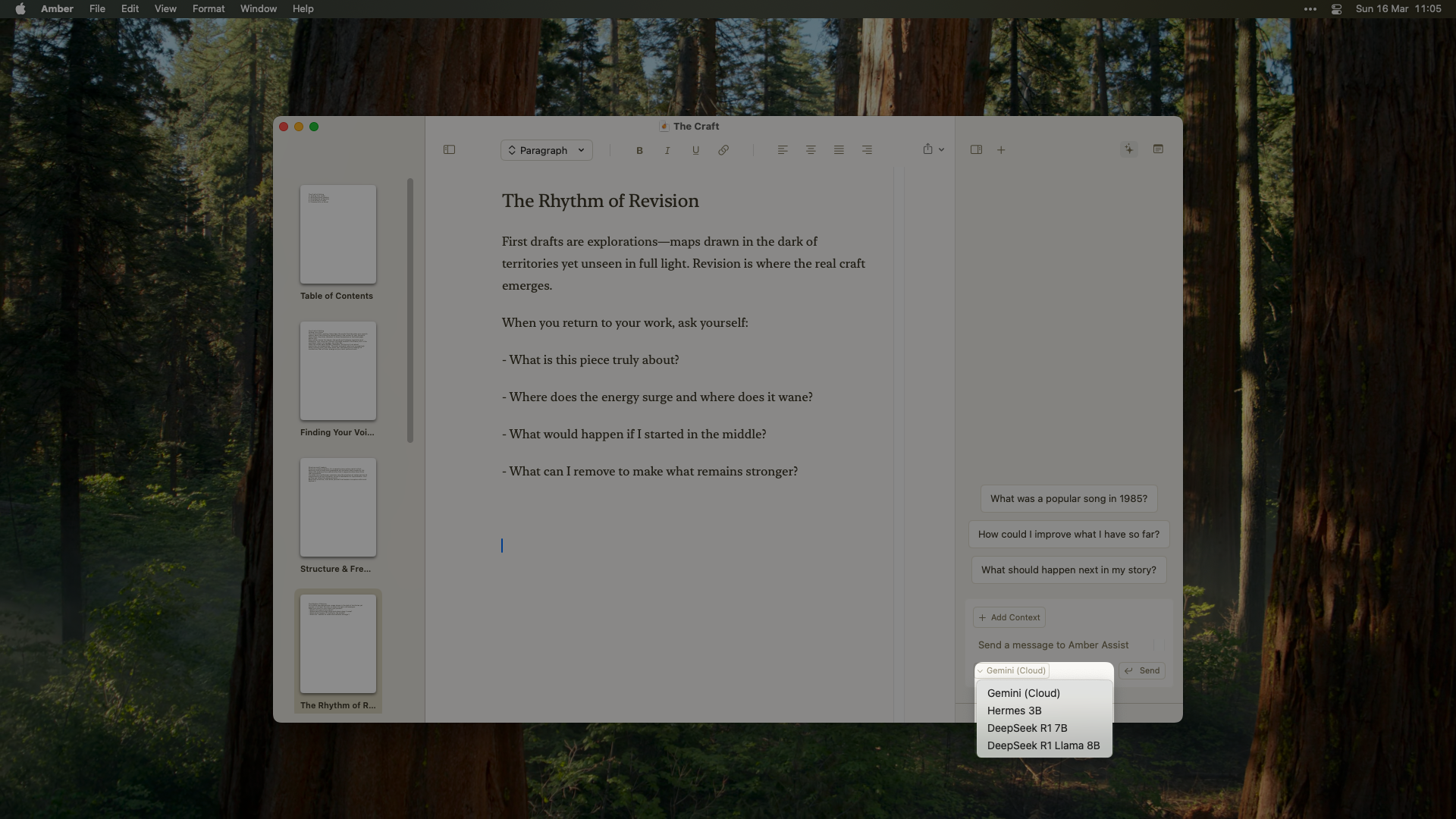
* **Redesigned model selection.** Cloud toggle moved into a dropdown menu.
### Changed
* **Redesigned model selection.** Cloud toggle moved into a dropdown menu.
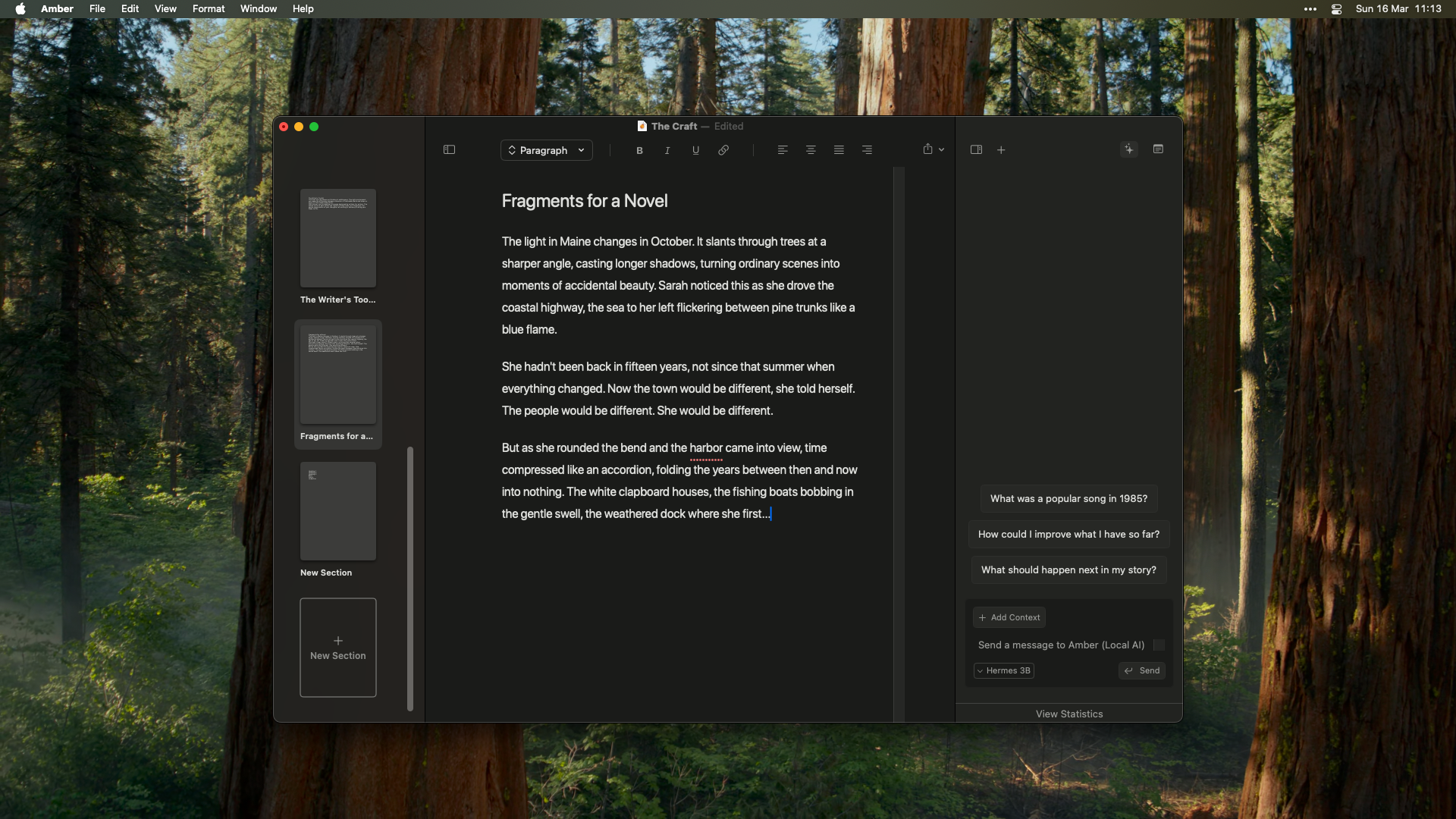
 * **Experimental dark mode improvements.**
 ### Fixed
* **Alignment shortcuts work.** Fixed keyboard shortcuts not working properly.
* Various UI and performance improvements.
## Markdown and File Menu
### Added
* **Font customization.** 4 font options for the editor.
* **Font scaling.** Resize with `⌘ +/-` or in settings.
* **[Markdown formatting.](/user-guides/text-formatting)** Type `#`, `##`, or `###` followed by a space for headings. Automatic formatting for bold, italic, and underline. New lines reset to paragraph format.
* **[File menu enhancements.](/user-guides/auto-save)** Revert, version history, and Recent Documents list.
### Fixed
* **Better Undo/Redo.** More reliable undo and redo throughout.
* **Copy/paste from Amber.** Fixed formatting issues, especially when copying from Amber itself.
* **Pasted text keeps formatting.** Text copied from Amber no longer pastes as plain text.
* **Undo after paste.** No longer returns previous content.
* **[`⌘ L` works without selection.](/user-guides/amber-copilot)** Open Amber Copilot even if no text is selected.
* **Clean File menu.** Removed extra menu item. (Thanks Jamie!)
* **Dark mode editor padding.** Fixed color issue.
* **Single Settings window.** Only one can be open at a time. (Thanks Jack!)
## Onboarding and Editor Polish
### Added
* **[Custom onboarding.](/user-guides/getting-started-writing-with-amber)** Guided experience for new users.
* **Focused writing mode.** Added padding to the sides of the editor. Auto-scrolls to your last section when opening existing workspaces.
### Changed
* **[Updated Amber Copilot actions.](/user-guides/amber-copilot)** Create notes and sections from chat.
* **Link icon in formatting bar.** Replaced the globe icon.
### Fixed
* **[`⌘ L` works without selection.](/user-guides/amber-copilot)** Fixed Amber Copilot not opening when no text is selected.
## Internal Linking and Fountain
### Added
* **[Internal linking.](/user-guides/internal-linking)** Link between sections and notes within your manuscript.
* **[Document setup flow.](/user-guides/document-setup)** Set custom context for your project.
* **Fountain support.** Open `.fountain` screenplay files. (Thanks Ryan!) *Note: removed in the v0.10.0 editor rewrite.*
## Quick Navigation and Safety
### Added
* **[Quick section navigation.](/user-guides/quick-navigation)** Jump to any section with `⌘ P`.
* **[Delete confirmations.](/user-guides/safety-features#delete-confirmations)** Confirmation dialogs for notes and sections.
* **[Undo deletions.](/user-guides/safety-features)** Undo section and note deletions with `⌘ Z`.
* **[Pop-up text formatting.](/user-guides/text-formatting)** Formatting menu when selecting text. `⌘ L` still works for Amber Copilot.
* **Shortcuts in command palette.** Keyboard shortcuts list visible in `⌘ K`.
### Changed
* **New section deletion shortcut.** Changed to `⌘ + ⇧ + ⌫` so `⌘ ⌫` works for line deletion.
### Improved
* **Better document import and paste.**
* **Bigger tap targets.** Increased button and field hitboxes across the app.
* **macOS 14 support.** Lowered minimum system requirement. (Thanks Jamie!)
### Fixed
* Various bug fixes and UI improvements.
## Links and Formatting
### Added
* **[External hyperlinks.](/user-guides/external-links)** Link support in documents. Internal links coming soon.
* **[Multi-paragraph formatting.](/user-guides/paragraph-formatting)** Header style changes and text alignment.
* **[Force save before Amber Copilot.](/user-guides/auto-save)** Ensures latest document state.
### Improved
* **Better document import and paste.**
* **Bigger tap targets.** Increased button and field hitboxes.
* **macOS 14 support.** Lowered minimum requirement. (Thanks Jamie!)
### Fixed
* Various bug fixes and UI improvements.
## Stability
### Added
* **[Auto-save before Amber Copilot.](/user-guides/auto-save)** Your work is saved before every interaction.
* **Better error handling.** Clearer error messages throughout.
### Fixed
* **Dark mode text.** Fixed black text display issue.
***
### Contributors
Thanks to our community for the great feedback! Share yours on our [feedback board](https://withamber.com/feedback), join our [Reddit community](https://www.reddit.com/r/writewithAmber/), or [report bugs](https://withamber.com/bugs).
## Export and Command Palette
### Added
* **Markdown export.** Easy sharing and compatibility.
* **Command palette.** Keyboard-first navigation with `⌘ K`.
* **Better error messages.**
* **Improved [response handling.](/user-guides/amber-copilot)**
## Limited Closed Beta
The first release of Amber. A distraction-free writing space with a built-in copilot.
### Added
* **[Cloud integration.](/user-guides/amber-copilot)** Gemini support.
* **Notes.** Store story facts and research data.
* **Sections.** Organize chapters and acts.
* **[Formatting toolbar.](/user-guides/text-formatting)** Full set of intuitive options.
* **Command palette.** `⌘ + K` to navigate.
* **Distraction-free editor.** Just you and your words.
* **[Version history](/user-guides/auto-save)** with auto-save.
* **[Privacy-first local storage.](/user-guides/storage)** Your files, on your device.
***
### Contributors
A special thank you to our closed beta testers for their invaluable feedback!
***
Want to see what's coming next? Get in touch and help us prioritize future features!
For support: [support@withamber.com](mailto:support@withamber.com)
### Fixed
* **Alignment shortcuts work.** Fixed keyboard shortcuts not working properly.
* Various UI and performance improvements.
## Markdown and File Menu
### Added
* **Font customization.** 4 font options for the editor.
* **Font scaling.** Resize with `⌘ +/-` or in settings.
* **[Markdown formatting.](/user-guides/text-formatting)** Type `#`, `##`, or `###` followed by a space for headings. Automatic formatting for bold, italic, and underline. New lines reset to paragraph format.
* **[File menu enhancements.](/user-guides/auto-save)** Revert, version history, and Recent Documents list.
### Fixed
* **Better Undo/Redo.** More reliable undo and redo throughout.
* **Copy/paste from Amber.** Fixed formatting issues, especially when copying from Amber itself.
* **Pasted text keeps formatting.** Text copied from Amber no longer pastes as plain text.
* **Undo after paste.** No longer returns previous content.
* **[`⌘ L` works without selection.](/user-guides/amber-copilot)** Open Amber Copilot even if no text is selected.
* **Clean File menu.** Removed extra menu item. (Thanks Jamie!)
* **Dark mode editor padding.** Fixed color issue.
* **Single Settings window.** Only one can be open at a time. (Thanks Jack!)
## Onboarding and Editor Polish
### Added
* **[Custom onboarding.](/user-guides/getting-started-writing-with-amber)** Guided experience for new users.
* **Focused writing mode.** Added padding to the sides of the editor. Auto-scrolls to your last section when opening existing workspaces.
### Changed
* **[Updated Amber Copilot actions.](/user-guides/amber-copilot)** Create notes and sections from chat.
* **Link icon in formatting bar.** Replaced the globe icon.
### Fixed
* **[`⌘ L` works without selection.](/user-guides/amber-copilot)** Fixed Amber Copilot not opening when no text is selected.
## Internal Linking and Fountain
### Added
* **[Internal linking.](/user-guides/internal-linking)** Link between sections and notes within your manuscript.
* **[Document setup flow.](/user-guides/document-setup)** Set custom context for your project.
* **Fountain support.** Open `.fountain` screenplay files. (Thanks Ryan!) *Note: removed in the v0.10.0 editor rewrite.*
## Quick Navigation and Safety
### Added
* **[Quick section navigation.](/user-guides/quick-navigation)** Jump to any section with `⌘ P`.
* **[Delete confirmations.](/user-guides/safety-features#delete-confirmations)** Confirmation dialogs for notes and sections.
* **[Undo deletions.](/user-guides/safety-features)** Undo section and note deletions with `⌘ Z`.
* **[Pop-up text formatting.](/user-guides/text-formatting)** Formatting menu when selecting text. `⌘ L` still works for Amber Copilot.
* **Shortcuts in command palette.** Keyboard shortcuts list visible in `⌘ K`.
### Changed
* **New section deletion shortcut.** Changed to `⌘ + ⇧ + ⌫` so `⌘ ⌫` works for line deletion.
### Improved
* **Better document import and paste.**
* **Bigger tap targets.** Increased button and field hitboxes across the app.
* **macOS 14 support.** Lowered minimum system requirement. (Thanks Jamie!)
### Fixed
* Various bug fixes and UI improvements.
## Links and Formatting
### Added
* **[External hyperlinks.](/user-guides/external-links)** Link support in documents. Internal links coming soon.
* **[Multi-paragraph formatting.](/user-guides/paragraph-formatting)** Header style changes and text alignment.
* **[Force save before Amber Copilot.](/user-guides/auto-save)** Ensures latest document state.
### Improved
* **Better document import and paste.**
* **Bigger tap targets.** Increased button and field hitboxes.
* **macOS 14 support.** Lowered minimum requirement. (Thanks Jamie!)
### Fixed
* Various bug fixes and UI improvements.
## Stability
### Added
* **[Auto-save before Amber Copilot.](/user-guides/auto-save)** Your work is saved before every interaction.
* **Better error handling.** Clearer error messages throughout.
### Fixed
* **Dark mode text.** Fixed black text display issue.
***
### Contributors
Thanks to our community for the great feedback! Share yours on our [feedback board](https://withamber.com/feedback), join our [Reddit community](https://www.reddit.com/r/writewithAmber/), or [report bugs](https://withamber.com/bugs).
## Export and Command Palette
### Added
* **Markdown export.** Easy sharing and compatibility.
* **Command palette.** Keyboard-first navigation with `⌘ K`.
* **Better error messages.**
* **Improved [response handling.](/user-guides/amber-copilot)**
## Limited Closed Beta
The first release of Amber. A distraction-free writing space with a built-in copilot.
### Added
* **[Cloud integration.](/user-guides/amber-copilot)** Gemini support.
* **Notes.** Store story facts and research data.
* **Sections.** Organize chapters and acts.
* **[Formatting toolbar.](/user-guides/text-formatting)** Full set of intuitive options.
* **Command palette.** `⌘ + K` to navigate.
* **Distraction-free editor.** Just you and your words.
* **[Version history](/user-guides/auto-save)** with auto-save.
* **[Privacy-first local storage.](/user-guides/storage)** Your files, on your device.
***
### Contributors
A special thank you to our closed beta testers for their invaluable feedback!
***
Want to see what's coming next? Get in touch and help us prioritize future features!
For support: [support@withamber.com](mailto:support@withamber.com)